Kev paub hauv paus Hauv qab hood
Txheeb xyuas qhov tsim
Qhib qhov chaw tsuas yog pab yog tias tus lej koj tab tom khiav yog tus lej uas yog luam tawm. Nymchat yog tsim los txiav txim siab yog li koj tuaj yeem tshawb xyuas koj tus kheej, los ntawm sab hauv app los yog los ntawm lub davhlau ya nyob twg.
Nplooj ntawv no yog tshuab txhais kom yooj yim. Cov lus Askiv thawj yog cov version uas siv.
Reproducible tsim
Tsim lub app emits a build-manifest.json muaj cov lus cog tseg, a
SHA-256 hash ntawm txhua qhov kev pabcuam HTML, JavaScript thiab CSS khoom vaj khoom tsev, thiab ib qho
bundleHash tshaj qhov khoom vaj khoom tsev tag nrho.
Qhov tso zis tsuas yog nyob ntawm qhov chaw cov ntsiab lus - txawm tias lub sijhawm sau cia yog qhov
cog lus lub sij hawm es tsis yog lub sij hawm tsim khiav - yog li leej twg rebuilding tib yam
commit tau txais cov ntaub ntawv byte-zoo tib yam thiab tib yam bundleHash.
Ib qho GitHub Action tom qab ntawd rov tsim dua txhua qhov kev cog lus ntawm nws tus kheej thiab kos npe ua pov thawj
ntawv pov thawj rau lub hash thiab cov manifest, yog li ntawd muaj ib tug kos npe rau tying a
bundleHash rau kev cog lus nyob rau hauv lub repository, tsim los ntawm lwm yam uas tsis yog lub
kev xa tawm.
Yuav Ua Li Cas Txog dialog checks
Txog nyob rau hauv header sau daim tshev nyob, hauv koj tus browser.
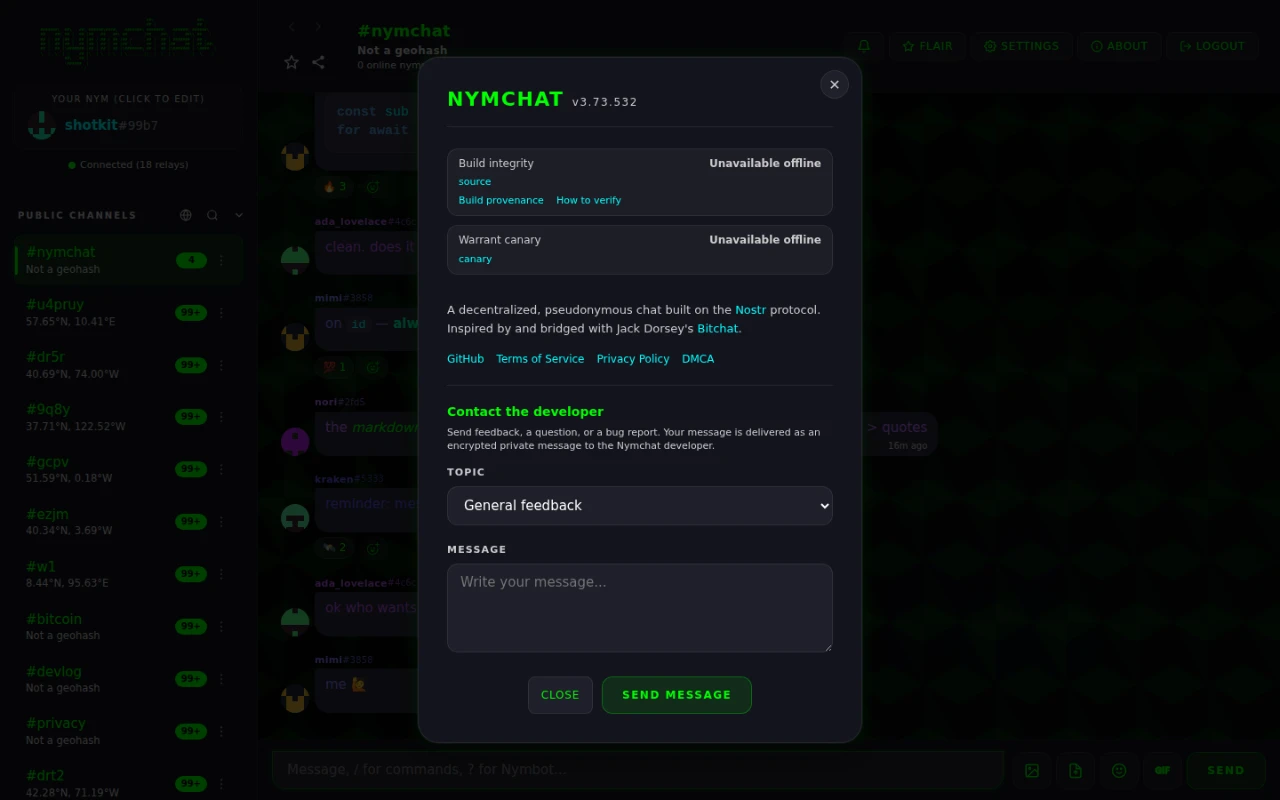
Nws rov ua dua txhua cov khoom vaj khoom tsev nplooj ntawv tab tom ua haujlwm, hashes nrog Web Crypto API, thiab
piv rau qhov tshwm sim. Tom qab ntawd - thiab qhov no yog qhov tseem ceeb - nws
recomputes cov bundleHash los ntawm hashs nws tsuas yog xam, tsis yog los ntawm
txhua yam uas manifest thov, thiab zoo li ntawd nyob rau hauv lub repository tus kos npe pov thawj
los ntawm GitHub API.
Qhov ntawd yog dab tsi txwv kev xa tawm los ntawm vouching rau nws tus kheej: pab hloov cov ntaub ntawv ua ke nrog ib qho kev sib piv manifest tseem ua tsis tau, vim hais tias cov recomputed hash tsis muaj ntawv pov thawj.
| xwm txheej | txhais tau tias |
|---|---|
| & tshawb xyuas; Verified official app (n/n) | Txhua qhov khoom vaj khoom tsev sib tw, cov khoom siv rov ua dua tshiab tau lees paub los ntawm qhov chaw cia khoom, thiab nplooj ntawv no tau txais kev pab los ntawm official domain. |
| ⚠ Verified build · tsis yog lub official app | Cov cai yog qhov tseeb thiab lees paub, tab sis qhov no yog daim iav ntawm lwm tus sau. Daim iav tsis tuaj yeem tshem tawm cov lus ceeb toom no yam tsis ua pov thawj tsis tiav. |
| ✗ Tsis sib haum | Lub cuab tam tsis hash rau qhov manifest hais. |
| ✗ Kev tsim tsis raug cai | Lub recomputed bundle hash tsis muaj ntaub ntawv pov thawj los ntawm lub chaw cia khoom - ib qho kev tshwm sim ntawm tus kheej. |
| ⚠ Cov ntawv pov thawj tsis tuaj yeem ncav cuag | GitHub API tsis tuaj yeem ncav cuag, yog li tsis tuaj yeem kuaj xyuas ob txoj kev. |
Txheeb xyuas koj tus kheej
Rebuild lub cog lus hais txog lub npe dialog thiab sib piv:
git clone https://github.com/Spl0itable/NYM
cd NYM
git checkout <commit shown in the About dialog>
npm ci
npm run build   # prints "Build hash: <bundleHash>"
Cov ntawv luam tawm yuav tsum phim ob qho tib si hauv Cov Lus Qhia thiab ib qho hauv qhov kev cog lus ntawd build-provenance run summary. Koj tuaj yeem tshawb xyuas qhov kos npe ncaj qha nrog GitHub CLI:
gh attestation verify dist/build-manifest.json --repo Spl0itable/NYMAndroid thiab iOS apps
Daim tshev saum toj no yog lub web-app check, thiab yog vim li cas tsim nyog hais meej: ib txwm app ua tsis tau ib yam rau nws tus kheej. Yuav ua li cas khiav ntawm koj lub xov tooj yog compiled tshuab code, tsis lub qhov chaw nyob rau hauv lub repository, thiab tsis muaj dab tsi lub app yuav xam tau rau ntawm lub ntaus ntawv hais txog ib tug mus rau lub lwm yam.
Android tuaj yeem ua qhov zoo tshaj plaws tom ntej. Cov ntsia .apk yog ib cov ntaub ntawv uas app tau nyeem
thiab hash, thiab cov hash ntawm txhua qhov kev tshaj tawm tau tshaj tawm rau pej xeem: tshaj tawm rau lub
Zapstore
kos npe rau Nostr kev tshwm sim nqa lub APK's SHA-256 thiab nws daim ntawv pov thawj kos npe SHA-256. Yog li cov
Android Txog dialog hashs lub APK nws tab tom khiav los ntawm, nqa cov kos npe
xwm txheej, tsuas yog cov uas kos npe los ntawm tus tsim tawm tus yuam sij, thiab sib piv. Nws qhia ob
hashes ib yam nkaus, yog li koj tuaj yeem rov ua qhov kos tawm ntawm lub cuab yeej: rub tawm APK luam tawm, khiav
sha256sum ntawm nws, thiab saib tib qhov xwm txheej koj tus kheej.
Ib qho app ntsia los ntawm Google Play tsis tuaj yeem kuaj tau li no, thiab qhov ntawd tsis yog ib qho cim tias muaj dab tsi tsis zoo. Google tshiab sau (re-signs) txhua yam uas muaj nqis rau nrog nws tus key thiab tsim ib lub APK twg rau txhua lub cuav, yog li ntawd yam uas tau los rau hauv koj lub xov tooj tsis yog lub file uas tus tsim tau tsim tawm los thiab nws lub hash tsis sib haum xeeb nrog dab tsi uas yuav tsum tau tshaj tawm. Lub app paub tias yog tau txais los ntawm Play thiab qhia li ntawd, tsis yog qhia tias nws tsis ua tau. Txhawm rau tshawb xyuas build koj tus kheej, tsuas yog ntxiv lub APK uas tau tshaj tawm ncaj qha.
iOS tsis tuaj yeem kuaj xyuas txhua. Apple encrypts thiab rov kos npe rau txhua qhov rub tawm ib tus zuj zus, yog li tus hash xam ntawm koj iPhone yog tshwj xeeb rau koj iPhone thiab tsis muaj dab tsi luam tawm nyob qhov twg. Lub dialog hais txog qhov no outright es tsis qhia ib tug reassuring xwm txheej uas txhais tsis muaj dab tsi. Yog tias koj xav tau Nymchat koj tuaj yeem tshawb xyuas ntawm Apple hardware, siv lub vev xaib app, uas kuaj xyuas txhua cov ntaub ntawv nws tab tom khiav.
Ib daim tshev app khiav ntawm nws tus kheej tsis tuaj yeem ua pov thawj tias lub app ncaj ncees - leej twg hloov nws tuaj yeem tshem tawm daim tshev thiab. Qhov nws ua pov thawj yog cov ntaub ntawv zoo tib yam: uas luam koj ntsia yog daim ntawv luam tawm. Qhov ntawd yog tsim nyog muaj vim qhov muaj nuj nqis nws kev sib piv yog pej xeem, yog li lwm tus neeg uas tsis yog koj tuaj yeem tshawb xyuas lawv, thiab tsis pom zoo.
Lub warrant canary
Daim ntawv cog lus canary yog ib nqe lus, luam tawm ntawm lub sijhawm teem tseg, uas tus tsim tawm muaj tsis yog tau txais tsab ntawv ceeb toom tseem ceeb uas lawv txwv tsis pub tshaj tawm - a Tsab Ntawv Kev Ruaj Ntseg Hauv Tebchaws, FISA xaj. Tus tsim tawm tuaj yeem yuam kom nyob twj ywm txog xws li kev txiav txim, tab sis tsis tuaj yeem yuam kom dag, yog li tus canary mus stale lossis ploj mus nws tus kheej lub teeb liab.
Nws nyob hauv canary.json ntawm lub hauv paus ntawm lub repository thiab yog nqa ncaj qha
los ntawm GitHub, yog li nws keeb kwm tuaj yeem tshawb xyuas ntawm nws tus kheej ntawm txhua qhov chaw xa tawm hais.
Qhov Hais txog dialog xim-codes nws:
| Xim | txhais tau tias |
|---|---|
| Ntsuab - txhua yam meej | Kos npe, tam sim no, thiab kos npe sib tw nrog tus tsim tawm tus yuam sij. Tsis tau txais kev txiav txim zais cia. |
| Daj - dhau sijhawm, lossis tsis meej | Nws tsis tau rov kho dua los ntawm nws cov hnub teev, lossis nws allClear chij yog cuav. Kev txiav txim uas ntsiag to tsis tuaj yeem txiav tawm. |
| Liab - kos npe tsis raug, lossis ploj mus | Qhov kos npe tsis phim tus tsim tawm tus yuam sij, lossis cov ntaub ntawv raug tshem tawm tag nrho. Kho qhov no raws li kev ceeb toom loj. |
Freshness thauj tog rau nkoj
Tus kos npe canary embeds qhov tseeb Bitcoin thaiv qhov siab thiab hash thaum lub sijhawm kos npe. Qhov hash tsis tuaj yeem paub ua ntej qhov thaiv muaj, uas ua pov thawj tias canary yog kos npe tom qab ib lub ntsiab lus tshwj xeeb hauv lub sijhawm tsis yog kos npe ua ntej hauv ntau lub hlis ua ntej. Cov lus hais txog txuas lub thauj tog rau nkoj mus rau block explorer yog li koj tuaj yeem tshawb xyuas nws.