Knowledge base Money and extras
Lightning and zaps
Bitcoin payments over the Lightning Network, attached to messages and profiles — and the one thing in Nymchat you can actually spend money on.
Sending a zap
A zap is a Lightning payment attached to a Nostr event (NIP-57). Two ways to send one:
- Zap Bitcoin from a message's context menu — zaps that message and shows on it;
/zap nym— zaps the person rather than anything they said.
Nymchat fetches an invoice from the recipient's Lightning address and hands it to your wallet to pay. Nymchat is not a wallet and never holds your funds; the payment is between your wallet and theirs.
On mobile you can also set Zap Bitcoin as a swipe action, under Settings › Mobile Gestures.
Receiving zaps
You need a Lightning address — the you@wallet.example form
that most Lightning wallets hand out. Put it in your profile: tap the "Your Nym" panel and
fill in Bitcoin Lightning Address.
Without one, anyone trying to zap you is told you have not set an address. Nothing else about your account changes.
Your Lightning address is published in your public profile, because that is how senders find it. If the address identifies you — a custodial wallet under your real name, say — then publishing it identifies you too. Consider a separate address for a pseudonymous identity.
The flair shop
The header's Flair button opens a shop of cosmetics, paid for over Lightning. They change how your messages and nickname look to other people inside Nymchat, and nothing else — there is no feature behind a paywall here.
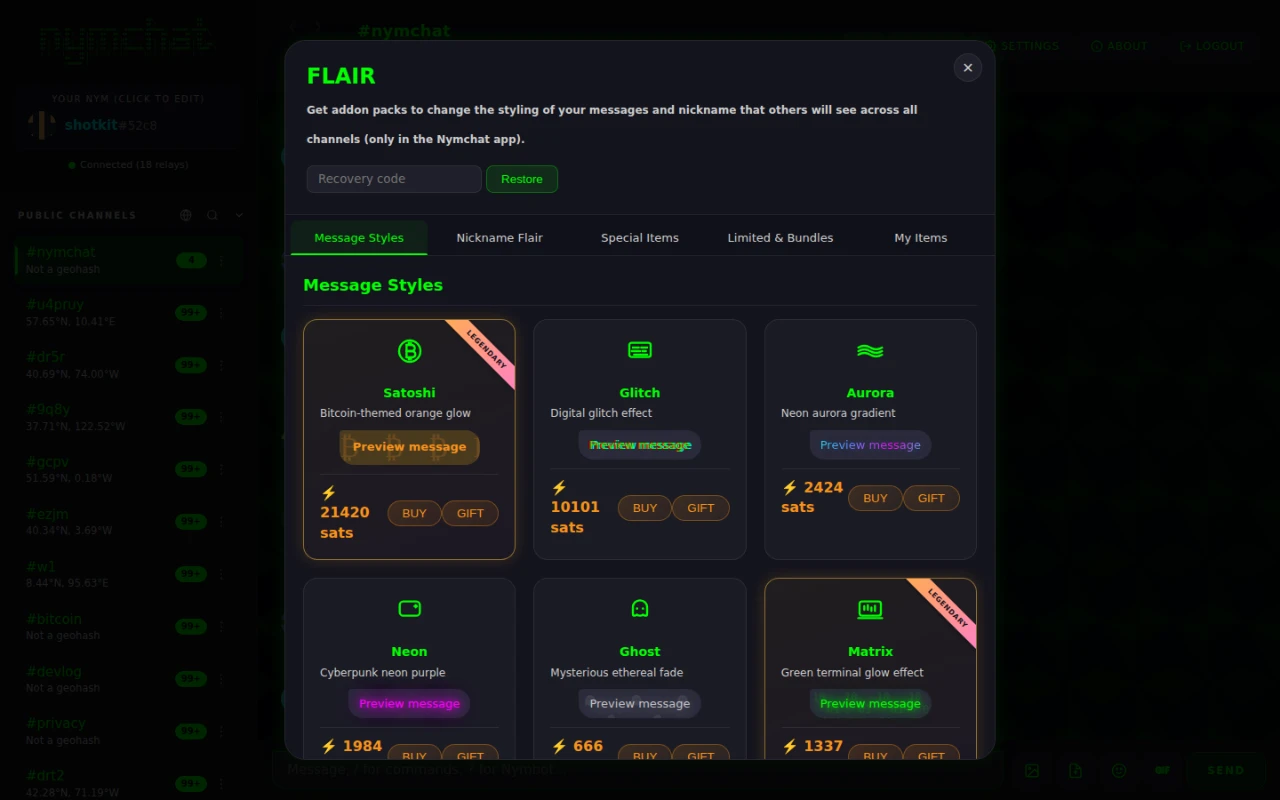
| Tab | What is in it | Roughly |
|---|---|---|
| Message Styles | How your message bubbles are painted — Matrix, Glitch, Aurora, Vaporwave, Satoshi and more | 666–21,420 sats |
| Nickname Flair | A glyph beside your nym — a crown, a skull, a lightning bolt, a Fawkes mask | 900–10,000 sats |
| Special Items | Auras, effects, and the Nymchat Supporter badge | 2,600–42,069 sats |
| Limited & Bundles | Capped-supply items and discounted packs | 3,000–149,999 sats |
| My Items | What you own, and where you gift or transfer it | — |
Every item has a Buy and a Gift button; gifting sends it straight to another nym. Items you own can also be transferred later from My Items.
Recovery codes
There is no account holding your purchases, so a purchase comes with a recovery code. Keep it: the Recovery code box at the top of the shop restores everything you have bought onto a new device or a new identity. Lose the code and lose the identity, and the items go with them.
These are Nymchat's own cosmetics, not part of the Nostr protocol. Other Nostr clients reading the same channels will show your messages plain.