Knowledge base Identity
Device security
End-to-end encryption protects a message in transit. This page is about the other half: the key sitting on your device, and getting rid of it in a hurry.
For the transit half — including the optional quantum-resistant encryption for private messages and group chats — see those pages instead.
Identity encryption
By default a saved private key sits in the device's local storage in the clear. Anyone who can read that storage — an unlocked device, a forensic tool, a browser profile copied off a shared machine — can read the key and become you.
Identity Encryption, under Settings › Privacy & Security, closes that hole. With it on:
- your
nsecis encrypted at rest with AES-GCM-256; - the ephemeral secret keys your group chats rely on are encrypted under the same vault key;
- the plaintext key is never written to disk while encryption is on — it exists only in memory, only for the session;
- unlocking happens once, when the app starts.
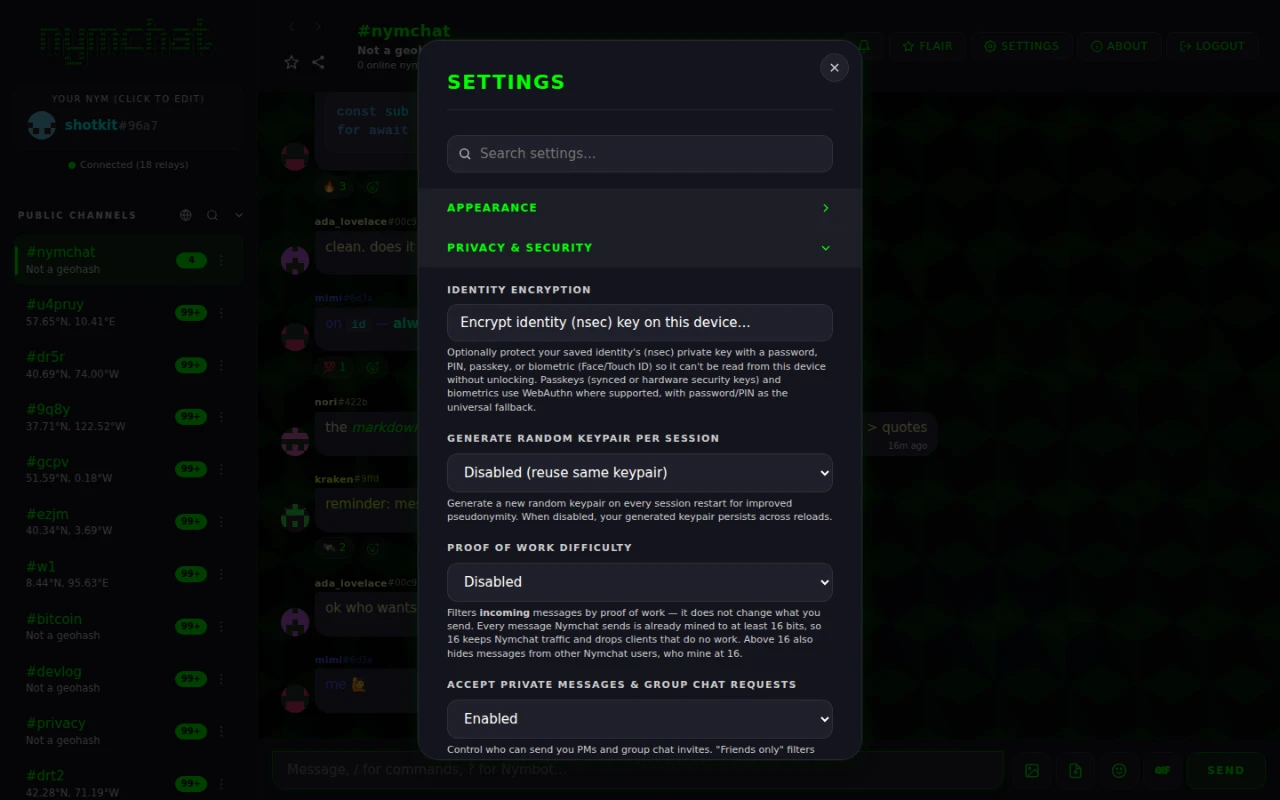
The unlock factor and the encrypted key are local to a device, so identity encryption is enabled per device. Only a non-sensitive on/off preference travels between devices, so a new device can offer to set it up too. No password, salt or credential is ever synced.
Choosing an unlock factor
You pick how the vault is unlocked on this device:
| Factor | How the key is derived | Available on |
|---|---|---|
| Password | PBKDF2-SHA256, 310 000 iterations | Everywhere |
| PIN | The same PBKDF2 derivation, digits only | Everywhere |
| Passkey | WebAuthn with the PRF extension, then HKDF-SHA256 | Web app |
| Biometric — Face ID, Touch ID, Windows Hello, Android biometrics, a hardware security key | WebAuthn PRF on the web; the platform's own biometric prompt on Android and iOS | Everywhere |
A PIN is a password made of digits, so treat a short one as exactly that: quick, and weak.
Not every authenticator implements the WebAuthn PRF extension, and one that does not cannot derive a key. So the moment you enable encryption the app makes you unlock once, there and then — better to find out immediately than the next time you open the app with no way back in.
Panic wipe
Press and hold the "Your Nym" panel for two seconds. Nymchat destroys every trace of itself on the device. There is no confirmation dialog, on purpose — the point is that it can be triggered fast, under pressure, without a second screen to get through.
A short animation shows the progress while it:
- drops the private key and the vault key from memory;
- encrypts every local- and session-storage value under a fresh random key that is immediately discarded, then overwrites those values with junk and clears the stores;
- overwrites and deletes every IndexedDB database;
- empties the cache storage and unregisters the service worker;
- clears cookies, then reloads to a pristine first-run state.
Step two is the interesting one. Deleting data does not necessarily make it unrecoverable, so the app encrypts it first under a key nobody — including the app — keeps. Whatever survives the delete is ciphertext with no key in existence.
A wiped identity is not recoverable, by you or by anyone. If the nym is one you want to
keep, back up its nsec before you ever need this. A normal single tap on
that panel just opens the nym editor, so a wipe does not happen by accident.
What is stored on your device
Nymchat keeps state locally so it can open instantly and work offline. Broadly:
| What | Notes |
|---|---|
| Your keypair | Encrypted at rest when identity encryption is on. Not stored at all in per-session or hardcore mode. |
| Settings and preferences | Theme, layout, blocked users and keywords, favorite channels, and the rest. |
| Channel history and profiles | A cache of what has been fetched from relays. |
| Decrypted private messages and group chats | Controlled by Cache PMs & Group Chats On Device (on by default). Turn it off and they are re-fetched and decrypted each launch instead of sitting on disk. |
| Group membership and ephemeral group keys | Encrypted under the vault key when identity encryption is on. |
| Flair purchases | Recoverable from a redeem code — see the flair shop. |
Settings › Data & Backup has two narrower tools than the panic wipe: Clear Local Storage Cache drops cached history, messages, profiles and reactions but keeps your login, settings, group memberships and purchases; Reset Settings to Defaults does the reverse.