Knowledge base Making it yours
Settings reference
Every setting, grouped the way the settings screen groups them, with what it does and what it starts as.
Where settings live
Everything is behind the Settings button in the header. There is a search box at the top — type into it and everything that does not match is hidden, section headings included — which is usually faster than remembering which group something is in.
The groups are the same in the web app and in the mobile apps, in the same order.
The settings groups
Appearance
Covered in full on Themes and layout. In short: Light/Auto/Dark, App Language, Theme, Chat View, Message Threads, Column Message Wallpaper, Chat Wallpaper, Message Layout, Visual Transparency and Text Size.
App Language is worth separating from the rest: it translates the interface, and has nothing to do with the translation settings for message text further down.
Privacy & Security
| Setting | Default | What it does |
|---|---|---|
| Identity Encryption | Off | Encrypts your saved private key at rest. See Device security. |
| Generate Random Keypair Per Session | Disabled | Disabled, Enabled, or Hardcore. See Ephemeral identities. |
| Proof of Work Difficulty | Disabled | Filters incoming messages by proof of work. See below. |
| Accept Private Messages & Group Chat Requests | Enabled | Enabled, Friends only, or Disabled. |
| Accept Audio & Video Calls | Enabled | Enabled, Friends only, or Disabled. Friends only ignores others silently. |
| Disappearing PM (forward secrecy) | Disabled | Adds a NIP-40 expiration tag to outgoing private messages. |
| Disappear After | 1 day | 1 hour to 7 days. Only applies with the above on. |
| Read Receipts | Enabled everywhere | Five scopes, from everywhere to off. |
| Typing Indicators | Enabled everywhere | The same five scopes. |
| Show Status Indicators | Enabled | Online/away/offline dots. Friends only broadcasts a hidden status publicly and the real one privately. |
| Cache PMs & Group Chats On Device | Enabled | Off means nothing decrypted is written to disk. |
| Blur Images from Others | Blur by default | Blur, friends-unblurred, or show everything. |
| Blocked Keywords/Phrases | Empty | See Keyword filters. |
| Friends | Empty | Friends bypass image blur and message filters. Added from any user's context menu. |
| Blocked Users | Empty | See Blocking. |
This filters what you receive; it never changes what you send. Every message Nymchat sends is already mined to at least 16 bits, so setting the filter to 16 keeps all Nymchat traffic while dropping unmined spam from elsewhere. 20 and 24 bits filter harder — and will hide Nymchat's own messages along with everything else.
Messaging & Display
| Setting | Default |
|---|---|
| Translation Language — around 45 languages for message translation | Disabled |
| Auto-translate Messages | Disabled |
| Auto-translate In — public channels, private messages, group chats, independently | All enabled |
| Notification Sound — eighteen choices plus Silent | Classic Beep |
| Auto-scroll Messages | Enabled |
| Show Timestamps | Show |
| Time Format | 12-hour |
| Date Format — used in the full timestamp shown when you tap a message time | Default |
Random Nickname Style — Fancy (adjective_noun) or Simple (nym1234) | Fancy |
| Auto Ephemeral Mode on Restart — skips the welcome screen | Disabled |
Channels
Group Chats & PMs Only Mode, Sort Geohash Channels by Proximity, Default Landing Channel, Hide All Non-Favorited Channels, and the lists of Hidden Channels and Blocked Channels. All default to off or empty, and all are covered on Channels.
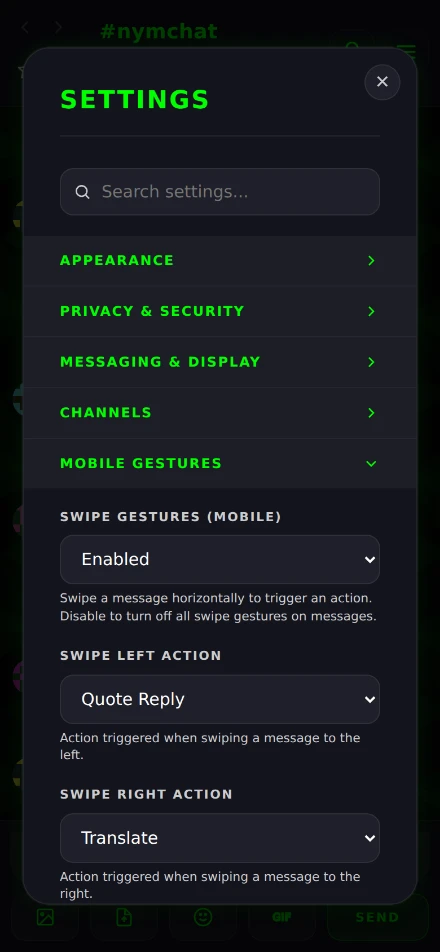
Mobile Gestures
Only shown on a narrow window — a phone, or a browser window under 768 px.
| Setting | Default |
|---|---|
| Swipe Gestures | Enabled |
| Swipe Left Action | Quote Reply |
| Swipe Right Action | Translate |
| Quick React Emoji | ❤️ |
| Swipe Sensitivity — how far you must swipe: 40, 60, 80 or 100 px | Medium (60 px) |
Either swipe direction can be Quote Reply, Translate, Copy Message, Quick React, Zap Bitcoin, Slap with Trout, Give Warm Hug, or None.
Data & Backup
| Setting | What it does |
|---|---|
| Low Data Mode (off by default) | Connects to only five default relays and loads geo relays on demand when you enter a channel. |
| Transfer Settings to Another User | Sends your nickname, avatar and all preferences to a pubkey you name. The recipient sees it under Pending Settings Transfers and accepts or rejects it. |
| Clear Local Storage Cache | Drops cached channel history, private messages, group chats, profiles and reactions. Keeps your login, settings, group memberships and flair purchases. |
| Reset Settings to Defaults | Resets preferences — theme, layout, wallpaper, sound, favorited/hidden/blocked channels, blocked users, blocked keywords. Keeps your login and your group memberships. |
Syncing settings between devices
With a persistent identity, your settings follow you. They are encrypted to your own key and stored so any device holding that key can fetch and decrypt them — nobody else can read them, including whoever is storing them.
Two deliberate exceptions:
- Per-session and hardcore keypair modes do not sync at all. The identity changes every session, or every message, so there is no stable key to store settings under.
- Identity encryption does not sync beyond an on/off hint, because the unlock factor and the encrypted key are local to the device. Set it up separately everywhere — see Device security.